
Gaming Laptop Overheating: 12 Solutions From Basic Fixes to Advanced Cooling Systems
Gaming laptop overheating is the arch-nemesis of every serious gamer. Nothing ruins an epic gaming session quite like thermal throttling that drops your frame rates from 144 FPS to a stuttering 30 FPS mess. At Chipfixers Infotech, we understand that your gaming rig isn’t just a laptop—it’s your competitive edge, your entertainment portal, and often your livelihood.
Whether you’re experiencing sudden shutdowns during intense gaming sessions, noticing performance drops in demanding titles, or hearing your laptop’s fans screaming like jet engines, laptop thermal management issues can transform your premium gaming machine into an expensive paperweight.
Table of Contents
Understanding Gaming Laptop Heat: The Enemy Within
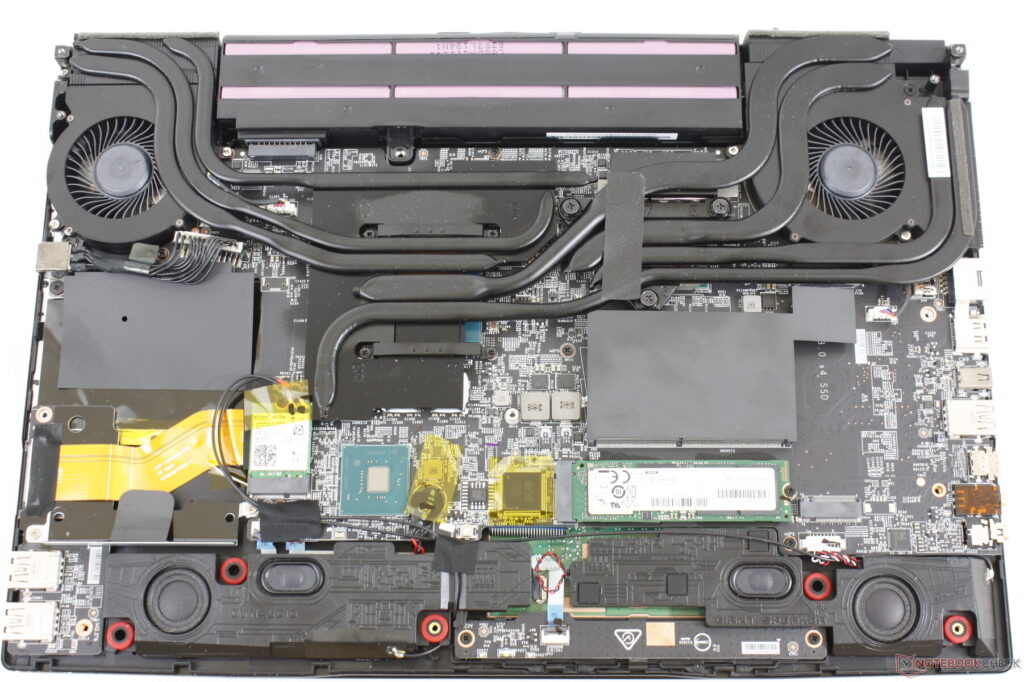
Modern gaming laptops pack desktop-class performance into portable form factors, creating a perfect storm for gaming laptop cooling challenges. Your RTX 4080 GPU and Intel i9 or AMD Ryzen 9 CPU can generate over 200 watts of heat in a space smaller than most textbooks.
Critical Temperature Thresholds:
- CPU: 85°C+ triggers thermal throttling
- GPU: 83°C+ reduces clock speeds automatically
- System Shutdown: 95°C+ emergency protection
- Long-term Damage: Sustained 90°C+ temperatures
When gaming laptop temperature exceeds these limits, your system automatically reduces performance to prevent hardware damage—exactly what you don’t want during competitive gaming or streaming.
12 Solutions: From Gamer DIY to Professional Thermal Engineering
Basic Fixes: What Every Gamer Can Do
1. Environmental Optimization
Laptop overheating fix often starts with your gaming environment. Your laptop’s cooling system is designed with specific ambient temperature assumptions.
Quick Environmental Fixes:
- Game in air-conditioned rooms (21°C/70°F optimal)
- Avoid soft surfaces like beds or couches
- Ensure 6+ inches clearance around vents
- Use hard, flat surfaces for maximum airflow
Pro Tip: Temperature drops of just 5°C in your room can reduce internal temperatures by 8-12°C, significantly improving performance.
2. Power Management Optimization
Gaming laptop repair often involves optimizing power delivery to reduce unnecessary heat generation while maintaining gaming performance.
Windows Power Settings:
- Switch to “Balanced” mode instead of “High Performance”
- Set maximum processor state to 95% (reduces heat significantly)
- Enable “System Cooling Policy” to Active
- Configure GPU power management for optimal performance
Gaming-Specific Settings:
- Limit frame rates to your monitor’s refresh rate
- Reduce unnecessary background processes
- Use MSI Afterburner for GPU undervolting
- Enable Windows Game Mode for resource optimization
3. Professional Cleaning and Maintenance
Laptop thermal throttling often results from dust accumulation blocking airflow through heat sinks and fans. Professional cleaning goes beyond surface dusting.
DIY Cleaning Steps:
- Power down and remove battery
- Use compressed air in short bursts
- Clean intake and exhaust vents thoroughly
- Remove keyboard for deeper access (if comfortable)
When Professional Cleaning Is Needed:
- Disassembly required for complete cleaning
- Heat sink removal for thorough dust removal
- Fan motor cleaning and lubrication
- Thermal interface material inspection
Intermediate Solutions: Enthusiast-Level Upgrades
4. Thermal Paste Replacement
Laptop cooling solutions often require thermal paste renewal. Factory thermal paste degrades over 2-3 years, especially under gaming loads.
DIY Thermal Paste Replacement:
- Use high-quality paste (Arctic MX-4, Thermal Grizzly Kryonaut)
- Clean old paste completely with isopropyl alcohol
- Apply thin, even layer using credit card method
- Reassemble carefully to avoid air bubbles
Professional Application Benefits:
- Liquid metal application for extreme performance
- Proper mounting pressure verification
- Thermal pad replacement for VRM cooling
- Performance testing and validation
5. Cooling Pad and External Solutions
External gaming laptop cooling solutions can provide 5-15°C temperature reductions when properly matched to your laptop’s design.
Effective Cooling Pad Features:
- Multiple large fans (120mm+ preferred)
- Adjustable fan speeds
- USB-powered with pass-through ports
- Ergonomic positioning for comfort
Advanced External Cooling:
- Vacuum cooling systems for specific laptop models
- Liquid cooling docks (for compatible laptops)
- Custom cooling pad modifications
- Laptop stand optimization for airflow
6. RAM and Storage Upgrades
Laptop heat issues can worsen with struggling components. Upgrading to faster, more efficient components reduces system stress and heat generation.
Heat-Reducing Upgrades:
- NVMe SSD upgrades (run cooler than mechanical drives)
- Higher-speed RAM (reduces CPU memory controller stress)
- Dual-channel memory configuration
- Quality component selection for efficiency
Advanced Solutions: Professional Thermal Engineering
7. Heat Pipe and Cooling System Modification
Advanced laptop cooling sometimes requires cooling system modifications that go beyond manufacturer specifications.
Professional Modifications:
- Additional heat pipe installation
- Vapor chamber upgrades
- Custom heat sink fabrication
- Thermal interface optimization
Warning: These modifications require specialized skills and may void warranties. Professional installation is essential for safety and effectiveness.
8. Fan System Upgrades and Replacement
Laptop fan replacement becomes necessary when original fans fail or prove inadequate for sustained gaming loads.
Professional Fan Services:
- High-performance fan motor upgrades
- Blade design optimization
- Bearing replacement and lubrication
- Custom fan curve programming
Signs Your Fans Need Professional Attention:
- Excessive noise levels
- Inconsistent speed control
- Grinding or clicking sounds
- Reduced airflow despite cleaning
9. Thermal Sensor Calibration and Monitoring
Gaming laptop performance optimization requires accurate thermal monitoring and response systems.
Professional Calibration Services:
- Thermal sensor accuracy verification
- Fan curve optimization for specific gaming loads
- BIOS thermal settings adjustment
- Custom monitoring software configuration
10. Component-Level Thermal Solutions
Laptop thermal repair at the component level addresses heat issues that simple maintenance cannot resolve.
Professional Component Services:
- GPU thermal pad replacement
- VRM cooling enhancement
- CPU mounting pressure optimization
- Memory module thermal management
11. Liquid Metal Application
Laptop cooling system performance can be dramatically improved with liquid metal thermal interfaces, but this requires professional expertise.
Liquid Metal Benefits:
- 10-20°C temperature reductions possible
- Long-term thermal performance stability
- Optimal heat transfer coefficient
- Professional application prevents damage
Professional Application Required:
- Electrical conductivity requires precise application
- Component masking to prevent shorts
- Proper surface preparation essential
- Long-term reliability testing
12. Complete Cooling System Redesign
For extreme gaming laptop overheating cases, complete cooling system redesign may be necessary.
Custom Cooling Solutions:
- Heat pipe routing optimization
- Additional cooling zones
- Airflow pattern modification
- Performance validation testing
Gaming Performance: Temperature vs. FPS Analysis
Gaming laptop temperature directly impacts your competitive performance:
Temperature Impact on Gaming:
- 65-75°C: Optimal performance, full boost clocks
- 75-85°C: Minor throttling, 5-10% performance loss
- 85-90°C: Significant throttling, 15-25% performance loss
- 90°C+: Severe throttling, 30%+ performance loss
Professional Thermal Analysis Services
Our laptop thermal management services include comprehensive analysis:
Advanced Diagnostic Testing:
- Thermal imaging under gaming loads
- Component-specific temperature monitoring
- Airflow analysis and optimization
- Performance benchmarking before/after
Gaming-Specific Testing:
- Real-world gaming scenario testing
- Sustained load temperature monitoring
- Frame rate stability analysis
- Thermal throttling identification
Cost-Benefit Analysis for Gaming Laptops
Gaming laptop repair investments should be evaluated against performance gains:
Professional Service ROI:
- Basic Cleaning + Thermal Paste: $80-120, 5-15°C improvement
- Fan Replacement + Optimization: $150-250, 10-20°C improvement
- Advanced Cooling Modification: $300-500, 15-25°C improvement
- Complete System Redesign: $500-800, 20-30°C improvement
Performance Value:
- Every 10°C reduction = ~15% performance improvement
- Sustained gaming sessions without throttling
- Extended component lifespan
- Competitive advantage maintenance
Gaming Community: Thermal Management Best Practices
Laptop overheating solutions work best when combined with proper gaming habits:
Competitive Gaming Optimization:
- Pre-game thermal system checks
- Temperature monitoring during matches
- Break periods for cooling during long sessions
- Environmental control for tournaments
Streaming and Content Creation:
- Thermal headroom planning for encoding
- Multi-hour session sustainability
- Equipment positioning for airflow
- Backup cooling strategies
When to Seek Professional Help
Gaming laptop cooling becomes a professional matter when:
- DIY solutions provide insufficient improvement
- Disassembly is required for proper service
- Warranty concerns prevent user modification
- Performance demands exceed standard cooling capacity
- Component replacement is necessary
Emergency Gaming Session Cooling
For immediate laptop heat issues during important gaming sessions:
Emergency Cooling Protocol:
- Reduce graphics settings temporarily
- Limit frame rate to reduce GPU load
- Close unnecessary background applications
- Position laptop for maximum airflow
- Take cooling breaks every 30-45 minutes
Professional Gaming Setup Thermal Design
Advanced laptop cooling for professional esports and streaming setups:
Tournament Preparation:
- Pre-event thermal system verification
- Backup cooling equipment
- Environmental control planning
- Performance consistency testing
Streaming Setup Optimization:
- Multi-hour thermal sustainability
- Silent cooling for audio quality
- Reliability for consistent schedules
- Professional appearance considerations
For more information about thermal management in gaming systems, visit the International Association of Thermal Engineers website (nofollow).
Conclusion: Dominate the Heat, Dominate the Game
Gaming laptop overheating doesn’t have to end your competitive dreams or streaming career. From simple environmental adjustments to advanced thermal engineering, solutions exist for every level of thermal challenge and technical comfort.
At Chipfixers Infotech, we understand that your gaming laptop isn’t just hardware—it’s your competitive weapon. Our thermal management specialists combine deep technical expertise with genuine gaming community understanding to deliver cooling solutions that match your performance demands.
Don’t let thermal throttling steal your victories or limit your content creation potential. Whether you need basic maintenance or advanced cooling system redesign, professional thermal management can restore your laptop’s performance and give you the competitive edge you deserve.
🎮 Gaming Laptop Thermal Solutions:
- 🌡️ Professional Thermal Analysis: Complete system evaluation
- 🔧 Performance Cooling Mods: Custom solutions for serious gamers
- ⚡ Emergency Gaming Support: Same-day service for tournament prep
- 💨 Advanced Cooling Systems: Liquid metal, custom heat pipes
- 📊 Performance Validation: Before/after benchmarking included
Ready to unleash your laptop’s full potential?
Is thermal throttling killing your gaming performance? Contact our gaming laptop thermal specialists for professional analysis and custom cooling solutions. Get back to dominating lobbies with consistent, peak performance.